
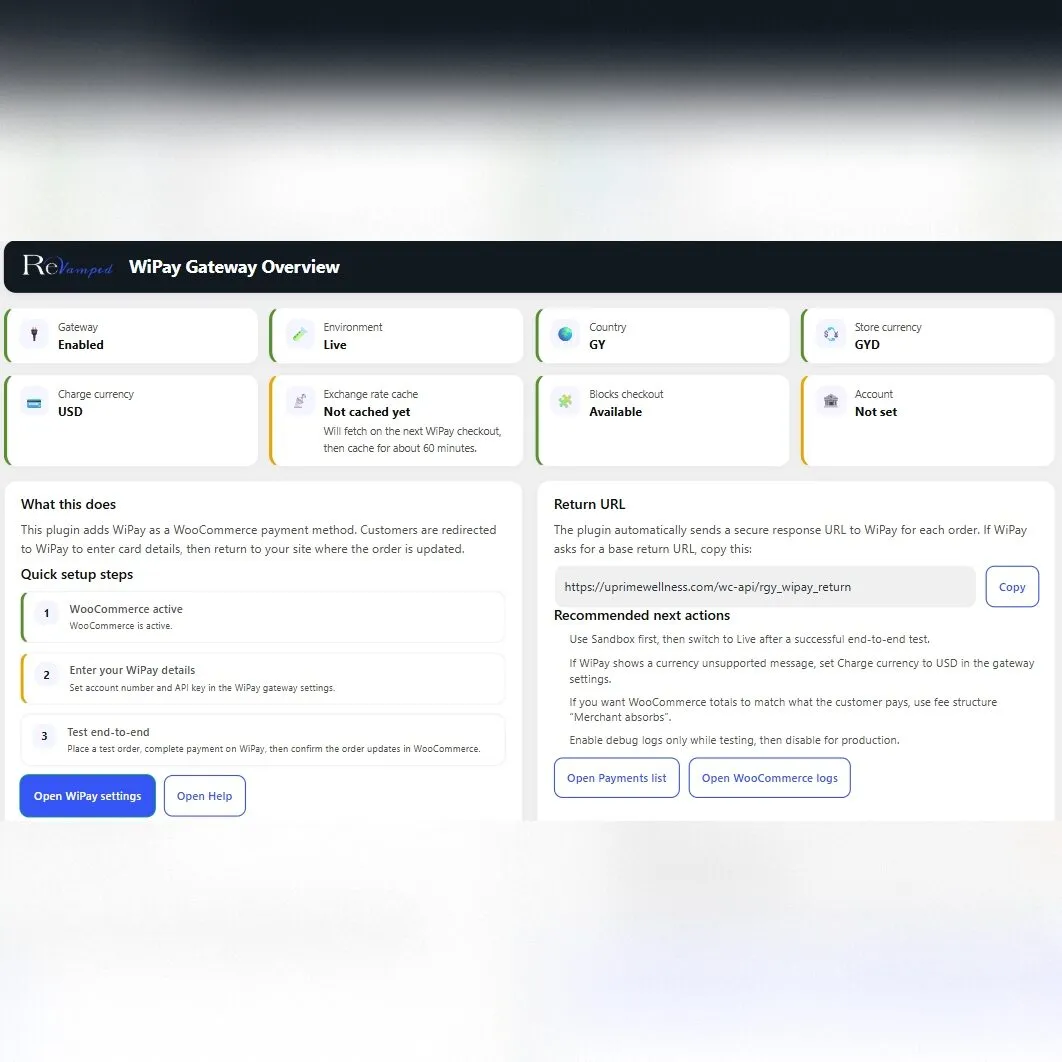

WiPay in your WooCommerce Store
If you run a WooCommerce store and want a simple way to collect payments through WiPay, the WiPay WooCommerce Plugin by Revamped GY is built for exactly that purpose. It is a free plugin for WordPress and WooCommerce stores that need a practical way to connect checkout to WiPay without adding extra plugin cost.
Latest Version: 1.1.7
Read Changelog
1.1.7
- I fixed a parse error in the Overview and Help admin pages caused by duplicated content outside the class methods
- I aligned the internal version constant with the plugin version
1.1.6
- I added improved Overview and Help pages with status cards, quick links and currency conversion guidance
1.1.5
- I added an option to charge in USD. The plugin converts the store currency to USD using a live exchange rate then rounds up to the next whole USD before redirecting to WiPay
- I stored the sent currency, original store currency, exchange rate and fetch time on the order to help troubleshooting
1.1.4
- I fixed a fatal error caused by an invalid WooCommerce FeaturesUtil reference in the main plugin loader
- I removed the duplicate Blocks compatibility declaration and kept Blocks compatibility declared only inside the Blocks integration class
1.1.3
- I fixed fatal errors caused by malformed admin and updater class files
- I kept only the native WordPress updater flow using the Update JSON URL
- I declared WooCommerce Blocks Checkout compatibility at the correct time
1.1.2
- I switched the updater to use a fixed Update JSON URL so updates work without an Updates admin page
1.1.1
- I added a neat “View details” link on the Plugins page that opens the WordPress plugin details popup with the description and changelog
1.1.0
- I added a self hosted updater that reads a JSON metadata file and shows updates inside WordPress
1.0.5
- I added stronger return validation including order ID and currency matching, transaction ID matching and stricter hash checks
- I added replay protection so completed orders cannot be reprocessed with a different transaction ID
- I added a signed return token with expiry to reduce return URL tampering and random endpoint probing
- I added lightweight rate limiting on the return endpoint and improved sanitised logging
1.0.4
- I fixed WooCommerce Blocks Checkout registration timing so the gateway no longer shows as incompatible on block based checkout
- I switched the Blocks checkout icon rendering to use the native icon slot so the logo stays small beside the payment method label
- I updated the default logo URL to the WiPay transparent logo
1.0.3
- I fixed block based Cart and Checkout support by adding the required Blocks integration class and frontend registration script
- I adjusted the WiPay logo to display as a small icon next to the payment method label
1.0.2
- I improved WooCommerce Blocks Checkout support by loading the Blocks integration only when Blocks is available
- I added the official WiPay logo icon so it appears next to the payment method in both Classic and Blocks checkout
1.0.1
- I improved debug logs by recording a sanitised version of the WiPay request payload to help troubleshooting
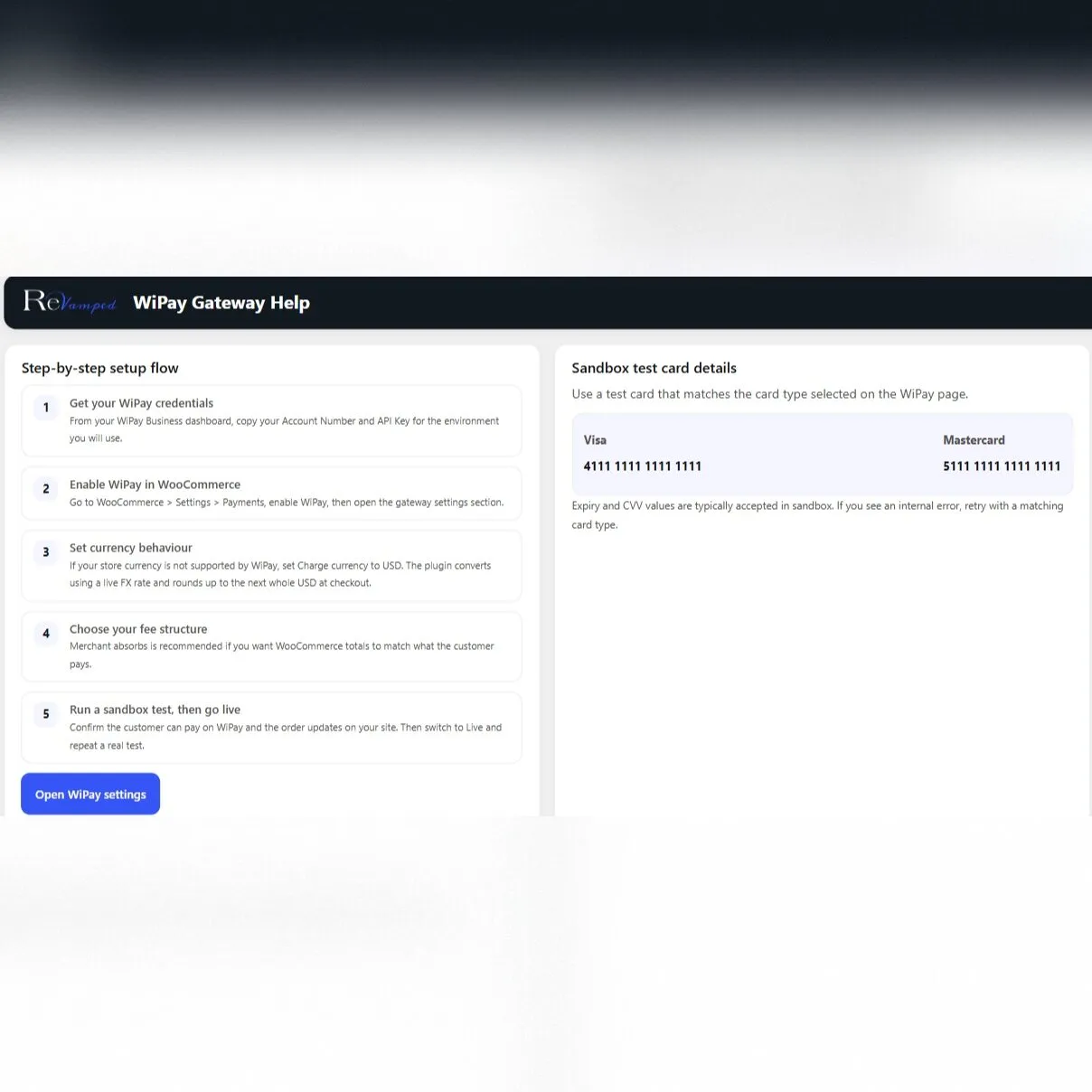
- I added a Help section with sandbox test card guidance
1.0.0
- I released the first version with the WiPay hosted checkout redirect flow
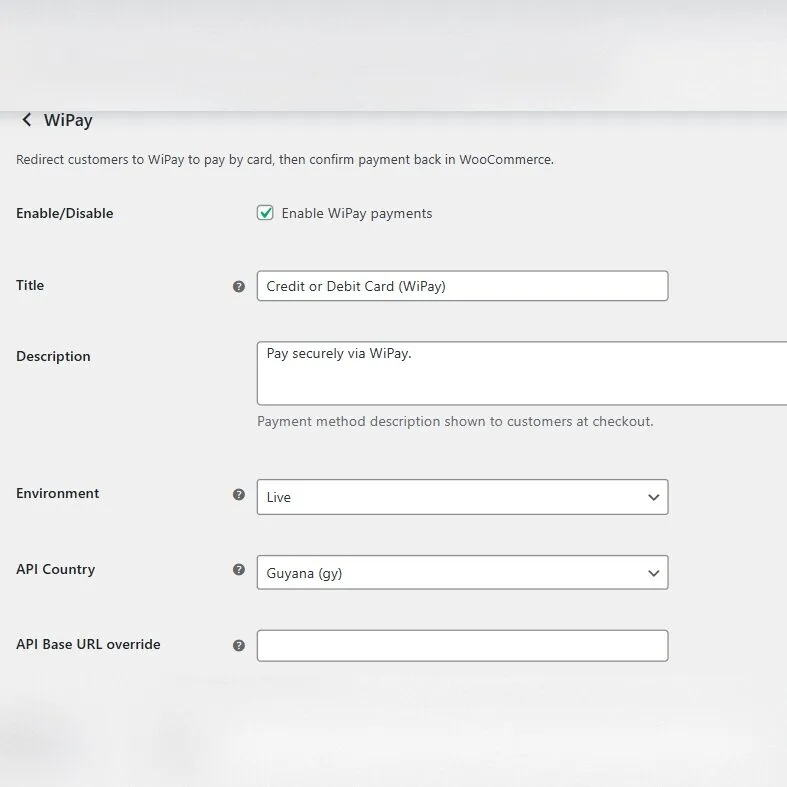
- I added sandbox and live settings, fee structure options, optional AVS and card type selection
- I added a branded Overview and Help page with copy buttons and setup guidance
- I added WooCommerce Blocks Checkout compatibility
For many store owners, the challenge is not building the website. The challenge is finding a payment option that fits the local market and works properly with WooCommerce. That is why a dedicated WiPay WooCommerce plugin matters.
What is the WiPay WooCommerce Plugin?
The WiPay WooCommerce Plugin is a WordPress plugin developed by Revamped GY for WooCommerce stores that want to collect payments through WiPay. In practical terms, it is designed to help online stores connect their WooCommerce checkout process to WiPay so customers can complete purchases more easily.
This matters because WooCommerce stores rely on payment gateway plugins to turn a website into a working online shop. A good plugin should fit naturally into the checkout experience, be easy to configure and reduce friction for both the business owner and the customer.
Key features of the WiPay WooCommerce Plugin
One reason store owners search for a WiPay WordPress plugin is that they want a solution built for the platforms they already use. This plugin is focused on that exact need.
- Built for WordPress and WooCommerce: Made specifically for stores that already run on WooCommerce.
- Collect payments through WiPay: Designed for businesses that want WiPay as part of their online payment setup.
- Free to download: Revamped GY is giving the plugin away for free, which lowers the entry cost for store owners.
- Focused payment integration: Instead of relying on workarounds, the plugin is made for a direct WiPay payment use case.
- Suitable for new and existing stores: Useful whether you are launching a new WooCommerce website or improving an existing one.
- Cleaner checkout setup: A dedicated plugin helps keep your payment setup more organised inside WordPress.
Advanced Settings and Currency Conversion
The plugin supports all countries who use the WiPay plugin and automatically converts to USD to process the payment.
WooCommerce Blocks Checkout Ready
Works properly with the modern Checkout block and Classic Checkout flows. No need to downgrade your store to older checkout pages.
Beginner Friendly
Get instructions to easily set up the plugin with your Wi Pay account, step by step even if you are not technically proficient.

Why use a WiPay plugin for WooCommerce?
The main reason is simple. If your store uses WordPress and WooCommerce, you need a payment solution that fits that environment properly. A dedicated WiPay WooCommerce plugin gives you a more direct route to accepting payments than trying to piece together a custom solution from multiple tools.
It also helps keep your store setup cleaner. When your payment method is handled through a focused WooCommerce plugin, your checkout flow is easier to manage and easier to explain to customers. That is especially useful for small and growing businesses that want a reliable setup without unnecessary complexity.
Another important point is cost. Because Revamped GY is giving this plugin away for free, store owners can start with a lower barrier to entry.
Who should use this free WiPay plugin?
This plugin is a strong fit for WordPress users who already run WooCommerce and want to collect payments through WiPay. It is also a practical choice for businesses that are launching a new online store and want to keep plugin costs under control while still using a payment method that fits their market.
To narrow the focus further, this plugin can be useful for retailers, service providers and other businesses that want a straightforward WooCommerce payment setup tied to WiPay.
Why this matters for WordPress stores
WooCommerce gives store owners control over how they sell online. A payment plugin is part of that flexibility because it allows the store to adapt checkout around the business model and the payment provider being used.
For businesses that want WiPay specifically, using a plugin made for that connection is the most direct route. It keeps the setup aligned with the way WooCommerce stores normally add payment gateways and gives store owners a solution built around the exact payment option they want to offer.
Get the WiPay WooCommerce Plugin free
If you have been searching for a WiPay WooCommerce plugin, a WiPay WordPress plugin or a free WiPay plugin for your store, this is the solution to look at. Revamped GY created this plugin for WordPress and WooCommerce stores that want to collect payments through WiPay, and the plugin is available for free.
For store owners, that means a simpler next step. Install the plugin, connect your WooCommerce store to WiPay and start building a checkout process that fits your business.
Ready to add WiPay to your WooCommerce store?
Frequently asked questions
What is the best WiPay WooCommerce plugin?
If you want a plugin built specifically for WordPress and WooCommerce stores to collect payments through WiPay, the free plugin by Revamped GY is a relevant option to consider.
Is there a free WiPay plugin for WordPress?
Yes. Revamped GY is offering its WiPay plugin for free for WordPress and WooCommerce stores.
Can I use WiPay with WooCommerce?
Yes. A dedicated plugin is a practical way to connect WiPay to a WooCommerce store and simplify payment collection through your WordPress website.
How it helps your store.
This plugin is not only about “taking a payment”. It helps you run your business.
-
Fewer abandoned checkouts
MMG is familiar to local customers. A trusted local option often increases the chance that customers finish payment.
-
Cleaner order management
When payments update properly, your fulfilment becomes easier. Staff can see whether an order is paid, pending, failed, cancelled or timed out.
-
Faster customer support
Instead of long back and forth messages, you can use a simple workflow and close issues quickly.
Who is this plugin for?
This plugin is ideal for WooCommerce stores that want a reliable WiPay checkout flow, especially stores using the WooCommerce Checkout block and stores that need strong admin tools like exports, verify payment and resend link.
If you are a developer, the plugin also gives you a clean, repeatable setup process for client sites.
Upgrade your business now.
You can download and try for yourself, or hire us to do it for you. We even provide ongoing support and so many other services!